Telegram OSINT: how to investigate users, channels and groups (2026 Guide)
Learn to investigate Telegram with OSINT: resolve a @username or t.me link, analyze public channels and groups, cross-reference the username across platforms and pivot to new identifiers, legally.
Learn to investigate Telegram with OSINT (Open Source Intelligence) techniques: resolve any @username or t.me link, tell channels, groups, bots and users apart, analyze the activity of public channels and cross-reference the username across hundreds of platforms. Discover how to profile an account or verify the authenticity of a channel starting from just a username — legally and professionally.
Why is Telegram so valuable in OSINT?
With over a billion users and millions of public channels and groups, Telegram has become one of the richest open sources for any investigation. Unlike other networks, much of its content is accessible without logging in through the t.me preview pages.
The @username works as a stable identifier that connects channels, groups, bots and personal accounts. With the right techniques, a simple handle can reveal the entity type, its size and verification, its recent activity and — when cross-referenced with other platforms — the full digital footprint of the person or project behind it.
Step 1: Resolve the @username or t.me link
The first step is to identify what is behind a username or a t.me link. This tells you at a glance:
- The entity type: channel, group, bot or user account.
- The name, description/bio and profile photo.
- Whether the account is officially verified.
- Whether the @username exists or has no public presence.
This phase is the foundation of any Telegram investigation: it tells a real account from a non-existent one and gives context before you dig deeper.
With Telegram OSINT you enter a @username, a channel name or a t.me link and instantly get the entity type, verification, description, photo and — for channels and groups — the member count.
Step 2: Analyze public channels and groups
When the entity is a public channel or group, the investigation is enriched with size and activity data:
- Subscribers or members and online users.
- Recent posts and their content.
- Last-activity date (is the channel still alive?).
- The description and associated links.
This data lets you verify the authenticity and relevance of a channel before trusting it, spot inflated or inactive channels and understand the real reach of a community.
Step 3: Cross-reference the username across platforms
A Telegram @username is rarely unique to that network. People reuse the same handle across dozens of services: social networks, forums, code platforms, marketplaces and communities.
Searching that username across hundreds of sites reveals where else the target has a presence and reconstructs their digital ecosystem — a classic and very powerful OSINT pivot.
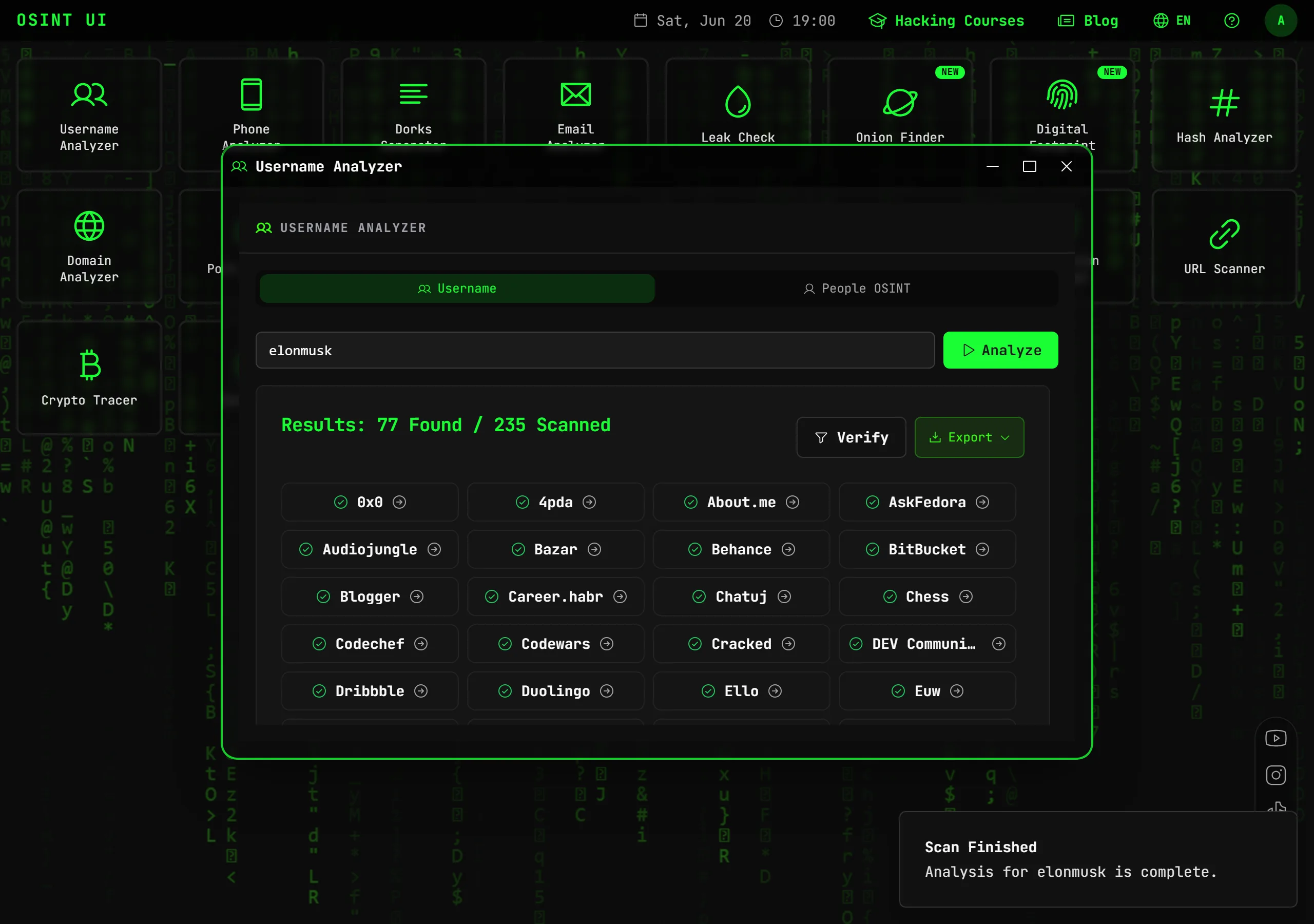
Username Analyzer checks the same username across hundreds of platforms and shows you which services it is registered on, with high-confidence verification to reduce false positives.
Step 4: Investigate bots and related accounts
Telegram bots (whose username ends in bot) are often part of specific campaigns, services or infrastructures. Their description, name and verification give clues about who operates them and to what end.
Likewise, many channels link to an associated discussion group, a website or other accounts. Each link is a new node that expands the investigation and connects the Telegram activity with the rest of the public footprint.
Step 5: Pivot to email, phone and more
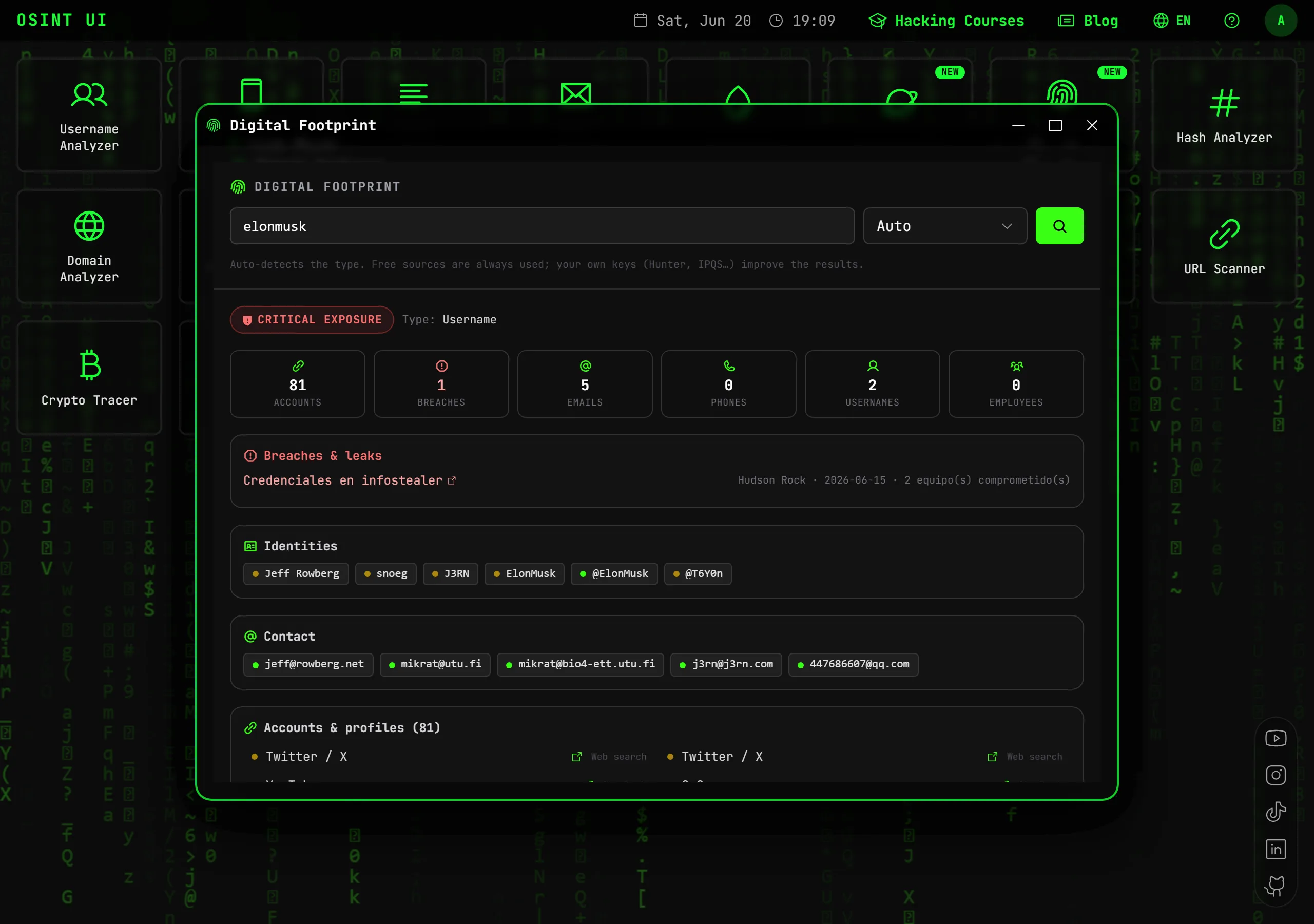
A confirmed Telegram account often leads to a username, a real name, an email or a domain published in its bio, its channel or the associated profiles. Each new data point opens a different path: the email lets you search breaches and accounts, the phone opens new databases and the domain reveals infrastructure.
This chaining of selectors — pivoting — is the essence of any advanced OSINT investigation, and a digital-footprint meta-tool can automate much of the process.
Best practices and legal considerations
Open-source intelligence works exclusively with public or legally accessible information. Always remember:
- Do not access private messages or chats.
- Do not impersonate identities to infiltrate closed groups.
- Comply with GDPR and applicable local regulations.
- Use these techniques only for legitimate purposes: cybersecurity, fraud prevention, threat intelligence or verification.
Conclusion
Investigating Telegram with OSINT turns a simple @username into a complete profile: entity type, size, verification, activity and presence on other platforms. The key is combining handle resolution, channel analysis, username cross-referencing and pivoting methodically.
Try Telegram OSINT for free and analyze any Telegram user, channel, group or bot in seconds.
Frequently asked questions
How do I investigate a Telegram user with OSINT?
Starting from their @username or a t.me link, you resolve the entity type (channel, group, bot or user) and extract its public data: title, verification, description, photo and member count. Then you cross-reference the username across other platforms and pivot to email or phone.
What public information can I get from a Telegram channel?
The name, description, subscriber count, whether it is verified, the photo and, for public channels, the recent posts and last-activity date. All from the public t.me preview page, with no login and no API key.
Is it legal to investigate Telegram accounts?
Yes, as long as you only use public information and for legitimate purposes (verification, anti-fraud, threat intelligence). You must not access private messages or impersonate anyone to infiltrate closed groups.
Related articles
How to Find All Information About a Person Online (OSINT 2026)
OSINT guide to find all public information about a person online from a single data point: name, email, phone or username. Step by step and legal.
Read articleHow to Find All of Someone's Social Media Profiles (OSINT 2026)
Learn to find all of a person's social media profiles: by username, by email or by name. Instagram, TikTok, X and hundreds of platforms at once.
Read articleMaltego vs OSINT UI: Comparison & Best Alternative (2026)
Maltego vs OSINT UI comparison: differences, price, learning curve and when to use each. The Maltego alternative with nothing to install, right in your browser.
Read articleOSINT for Companies: How to Investigate a Company & Its Digital Footprint (2026)
OSINT guide for companies: investigate a company's domain, subdomains, public assets, breaches and digital footprint. For due diligence and cybersecurity.
Read articleTools for your investigation
Find a username's profiles across hundreds of social networks and platforms, verifying that each one exists.
OpenVerify an email's existence and reputation, its associated profiles and its presence in known data breaches.
OpenSearch for leaks of an email, domain, IP or phone across pastes, leaks, forums and the darknet with Intelligence X.
OpenUnlock the full OSINT suite
Go PRO and get Digital Footprint, Leak Check and all 19 professional tools, with no monthly limits.
🎟️ Use code OSINT50 and save 50% on your first month