How to Search the Dark Web: Find and Verify .onion Sites (OSINT 2026)
Learn how to search Tor hidden services and verify .onion links safely: what the dark web is, how Ahmia indexes .onion sites, and how to check whether an onion is live without installing Tor.
The dark web concentrates marketplaces, forums and leaks that never show up on Google. Learn how to search Tor hidden services (.onion), verify whether a link is live, and extract its title and description safely and legally — without installing Tor on your machine.
What is the dark web and why it matters in OSINT
The dark web is the part of the internet reachable only through anonymity networks like Tor. Its sites use .onion addresses (hidden services) that don't resolve in normal DNS and aren't indexed by traditional search engines like Google or Bing.
In an OSINT investigation, the dark web matters because it's where data breaches, illicit marketplaces, cybercrime forums and leak panels are published — often long before (or instead of) appearing on the clearnet. Monitoring this layer lets you detect leaked credentials, brand mentions, or an organization's exposure.
The challenge: you can't Google a .onion
Unlike a normal domain, a .onion (v3) address is a 56-character pseudo-random string derived from a public key, e.g. huupank42eulnaeb7gartdz3b24…onion. It isn't human-readable, isn't resolved by DNS, and changes often. That's why you need a search engine specialized in hidden services.
The reference engine is Ahmia, a search engine that continuously crawls the Tor network and indexes public .onion services, exposing them on the clearnet with their title, description and last-seen date.
Searching hidden services with Onion Finder
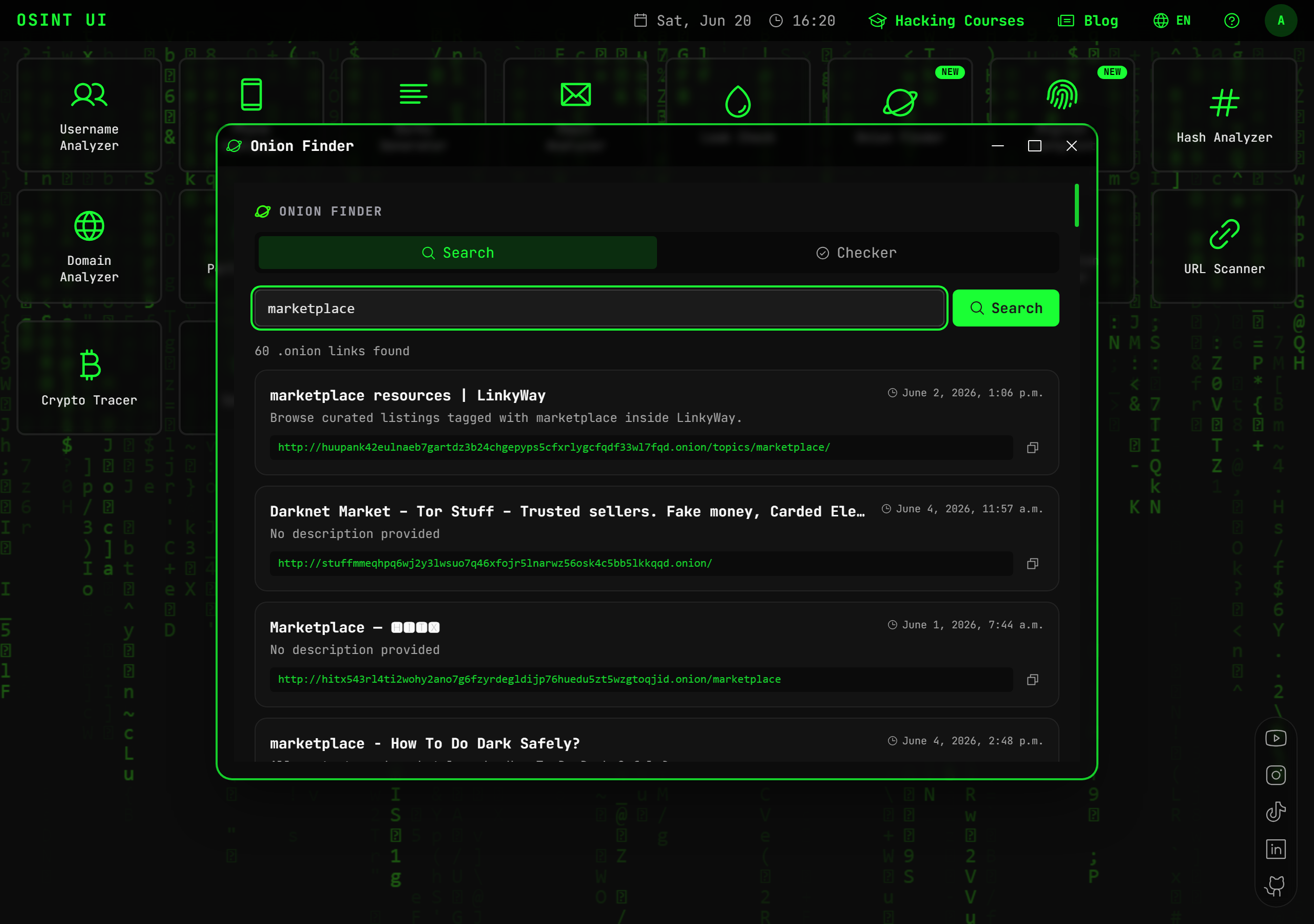
OSINT UI's Onion Finder lets you search the dark web without standing up your own Tor infrastructure. You enter a term (for example marketplace, forum or a brand name) and get the indexed .onion services that match, with their title, description and the last time they were seen active.
- ✅ Search over the Ahmia index, the dark web standard.
- ✅ Results with title, description and a ready-to-copy
.onionlink. - ✅ No Tor install, no exposing your IP.
Verifying whether a .onion link is live
Finding a link is only half the job: hidden services go down constantly. Before citing a .onion in a report you need to confirm it responds and know what it contains.
Onion Finder's Checker tab reaches the hidden service live through the Tor network and returns:
- Real reachability status (online / offline) and HTTP code.
- The page's real title and description, extracted straight from the service.
- Whether it's also indexed in Ahmia and when it was last seen.
This lets you tell an active marketplace from a dead domain or a honeypot without risking opening the link in your own browser.
Best practices and legality
Investigating the dark web with OSINT is legal as long as you stick to public information and don't take part in illicit activity. Recommendations:
- Don't interact with illegal marketplaces or download criminal content.
- Never enter credentials or personal data into
.onionsites. - Document your findings (URL, title, date) to keep the chain of custody.
- Use these techniques for legitimate purposes: Threat Intelligence, brand protection, leak detection and incident response.
From the dark web to the rest of the investigation
A dark web finding is rarely isolated. A marketplace may mention an email, a forum may leak a corporate domain, and a leak panel may expose credentials. From there you can pivot to the rest of the investigation: check whether those credentials appear in known breaches or map the target's full digital footprint.

Conclusion
Searching the dark web no longer requires standing up your own Tor infrastructure or risking your machine. With Onion Finder you can discover .onion services over the Ahmia index and verify live whether a link is active, with its real title and description — all from the browser, safely.
Try Onion Finder and start monitoring the layer of the internet that Google doesn't see.
Tools for your investigation
Find a username's profiles across hundreds of social networks and platforms, verifying that each one exists.
OpenVerify an email's existence and reputation, its associated profiles and its presence in known data breaches.
OpenSearch for leaks of an email, domain, IP or phone across pastes, leaks, forums and the darknet with Intelligence X.
OpenTake your investigations to the next level
Upgrade to OSINT UI PRO and unlock advanced searches, bulk analysis and every professional tool in the OSINT ecosystem.